Namespaces 04 - PID namespace
Linux Namespaces Learning · Previous: UTS namespace · Next: NET namespace
The Slovak original of this document: Namespaces 04 - PID namespace (slovensky).
PID (process identifier) namespaces in Linux
1 Introduction
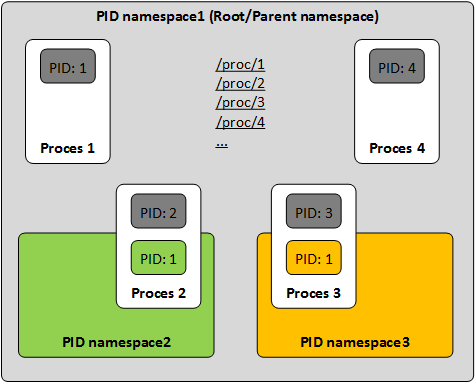
The PID namespace (process identifier) isolates process identifiers. Programs in different PID namespaces can hold the same PID.
2 Working with PID namespaces
The examples use a user namespace (--user --map-root-user) so that no root is needed. As root the same commands work without these two options (unshare --pid --fork ...).
2.1 The PID in the default namespace
Print the PID of the shell and the PID namespace it is in.
$ echo $$
$ 1226110
$ readlink /proc/self/ns/pid
$ pid:[4026531836]
2.2 Creating a new PID namespace
A process never changes its own PID namespace. --pid alone therefore leaves the started command where it was; only a child lands in the new namespace. --fork makes unshare start the command as its child, and that child is PID 1 there.
$ unshare --user --map-root-user --pid sh -c "echo \$\$"
$ 1226270
$ unshare --user --map-root-user --pid --fork sh -c "echo \$\$"
$ 1
2.3 Why ps still shows the host processes
ps does not ask the kernel for a list of processes; it reads the directory /proc. The /proc mounted on the host belongs to the PID namespace of the host, so inside the new namespace ps still counts all processes of the host, and /proc/self points to the outer PID.
$ unshare --user --map-root-user --pid --fork sh -c "echo \$\$; ps ax | wc -l; readlink /proc/self"
$ 1
$ 391
$ 1233656
--mount-proc mounts a fresh /proc for the new namespace (in a new MNT namespace, so the host is not affected). Now the view is consistent.
$ unshare --user --map-root-user --pid --fork --mount-proc sh -c "ps ax; readlink /proc/self"
$     PID TTY      STAT   TIME COMMAND
$       1 ?        S      0:00 sh -c ps ax; readlink /proc/self
$       2 ?        R      0:00 ps ax
$ 1
2.4 The same process seen from outside
In terminal 1, start a few processes in a new PID namespace.
$ unshare --user --map-root-user --pid --fork --mount-proc sh -c 'sleep 6 & sleep 5 & wait'
In terminal 2, in the default namespace, the same processes are ordinary processes with ordinary PIDs. lsns -t pid lists the new namespace, and the NSpid line in /proc/PID/status gives the PID of one process in every namespace it is visible in: 1226287 on the host, 3 inside.
$ lsns -t pid -p 1226287
$         NS TYPE NPROCS     PID USER COMMAND
$ 4026534273 pid       3 1226285 user sh -c sleep 6 & sleep 5 & wait
$ grep -E '^(Name|Pid|PPid|NSpid):' /proc/1226287/status
$ Name:	sleep
$ Pid:	1226287
$ PPid:	1226285
$ NSpid:	1226287	3
Enter the namespace with nsenter (user, PID and MNT namespace of the target) to see it from inside.
$ nsenter -t 1226287 -U -p -m --preserve-credentials ps ax
$     PID TTY      STAT   TIME COMMAND
$       1 ?        S      0:00 sh -c sleep 6 & sleep 5 & wait
$       2 ?        S      0:00 sleep 6
$       3 ?        S      0:00 sleep 5
$       4 ?        R      0:00 ps ax
2.5 When PID 1 of the namespace exits
PID 1 is the init process of the namespace. When it ends, the kernel kills every other process in the namespace. Here the shell is PID 1; it leaves sleep 300 in the background and exits. The second command, run on the host afterwards, finds no sleep 300 any more and prints nothing.
$ unshare --user --map-root-user --pid --fork --mount-proc sh -c "sleep 300 & sleep 1; ps ax; echo init exits"
$     PID TTY      STAT   TIME COMMAND
$       1 ?        S      0:00 sh -c sleep 300 & sleep 1; ps ax; echo init exits
$       2 ?        S      0:00 sleep 300
$       4 ?        R      0:00 ps ax
$ init exits
$ pgrep -a -x sleep | grep "sleep 300"
2.6 Nesting
PID namespaces nest. In terminal 1, create a second PID namespace inside the first one and run sleep 777 in it. Seen from the first namespace it is PID 4.
$ unshare --user --map-root-user --pid --fork --mount-proc sh -c 'unshare --pid --fork --mount-proc sleep 777 & sleep 1; ps ax; wait'
$     PID TTY      STAT   TIME COMMAND
$       1 ?        S      0:00 sh -c unshare --pid --fork --mount-proc sleep 777 & sleep 1; ps ax; wait
$       2 ?        S      0:00 unshare --pid --fork --mount-proc sleep 777
$       4 ?        S      0:00 sleep 777
$       5 ?        R      0:00 ps ax
In terminal 2, on the host, the same sleep 777 has three PIDs, one per level: 1226780 on the host, 4 in the first namespace, 1 in the second. A process is visible in its own PID namespace and in every ancestor of it, never in a sibling or a child.
$ grep NSpid /proc/1226780/status
$ NSpid:	1226780	4	1
$ lsns -t pid
$         NS TYPE NPROCS     PID USER COMMAND
$ 4026531836 pid      31    4085 user catatonit -P
$ 4026534271 pid       2 1226777 user sh -c unshare --pid --fork --mount-proc sleep 777 & sleep 1; ps ax; wait
$ 4026534273 pid       1 1226780 user sleep 777
Current practice (checked 2026-10)
- Signals to PID 1: the init process of a PID namespace only receives signals it has installed a handler for.
kill -TERM 1from inside the namespace does nothing to a plainshorsleep, and from the parent namespace only SIGKILL and SIGSTOP are always delivered. Asleepleft running as PID 1 has to be ended withkill -9from outside. - Cleaning up:
unshare --kill-childsends SIGKILL to the forked child whenunshareitself ends; combined with--pidthat takes the whole process tree of the namespace down. - Without a user namespace: an ordinary user gets
unshare: unshare failed: Operation not permittedforunshare --pid --fork; creating a PID namespace needsCAP_SYS_ADMIN, which the user namespace provides.
Sources: