Namespaces 05 - NET namespace
Linux Namespaces Learning · Previous: PID namespace · Next: Connecting a network namespace to the host system - with a veth pair
The Slovak original of this document: Namespaces 05 - NET namespace (slovensky).
NET (network stack) namespaces in Linux
1 Introduction
The NET namespace (network stack) isolates the network resources. Each network namespace has its own devices, addresses, routing tables, port numbers and its own "/proc/net" directory.
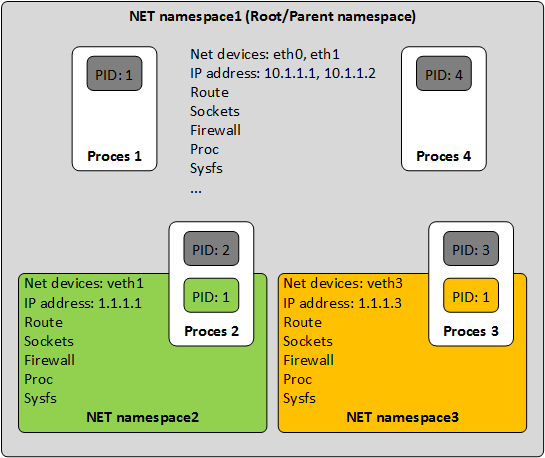
2 Working with NET namespaces
2.1 Creating new NET namespaces
Create two network (NET) namespaces, the first named "ns1" and the second "ns2".
# ip netns add ns1
# ip netns add ns2
2.2 Checking that the new network (NET) namespaces exist
# ls -l /var/run/netns
----------------------------------------------------------------------------------------------------------------
-r--r--r--. 1 root root 0 Nov 10 12:28 ns1
-r--r--r--. 1 root root 0 Nov 10 12:28 ns2
2.3 Listing every network (NET) namespace
List every network (NET) namespace with "ip".
# ip netns list
----------------------------------------------------------------------------------------------------------------
ns2
ns1
----------------------------------------------------------------------------------------------------------------
# ip netns list-id
----------------------------------------------------------------------------------------------------------------
nsid 0 (iproute2 netns name: ns1)
nsid 1 (iproute2 netns name: ns2)
2.4 Monitoring the creation/removal of network (NET) namespaces
"ip" with the parameters "netns monitor" can monitor the creation and removal of network namespaces.
# ip netns monitor
----------------------------------------------------------------------------------------------------------------
delete ns2
add ns2
2.5 Running processes inside network (NET) namespaces
The example below runs a BASH process in the namespace named "ns1".
[1]TERM1# ip netns exec ns1 bash
[2]TERM1# echo $$
----------------------------------------------------------------------------------------------------------------
27768
----------------------------------------------------------------------------------------------------------------
[3]TERM1# ifconfig -a
----------------------------------------------------------------------------------------------------------------
lo: flags=8<LOOPBACK>  mtu 65536
        loop  txqueuelen 1  (Local Loopback)
        RX packets 0  bytes 0 (0.0 B)
        RX errors 0  dropped 0  overruns 0  frame 0
        TX packets 0  bytes 0 (0.0 B)
TX errors 0 dropped 0 overruns 0 carrier 0 collisions 0- [1] - In network namespace "ns1", exec the command "bash".
Basically we "move" into namespace "ns1" and all the following commands are executed in this namespace.
- [2] - Find the PID of the BASH process.
- [3] - List every network adapter available in namespace "ns1".
In the second terminal (TERM2), check that the new network namespace exists with "namespaces-info.sh", printing only the non-default namespaces (the -n switch). Two namespaces (MNT and NET) have been created for our BASH process (27768).
TERM2# ./namespaces-info.sh -n
----------------------------------------------------------------------------------------------------------------
---------- + ---------- + -------------------- + ----------------------------------------
PID        | PPID       | NAMESPACE            | COMMAND
---------- + ---------- + -------------------- + ----------------------------------------
18         | 2          | mnt:[4026531856]     | [kdevtmpfs]
---------- + ---------- + -------------------- + ----------------------------------------
585        | 1          | mnt:[4026532423]     | /usr/lib/systemd/systemd-udevd
---------- + ---------- + -------------------- + ----------------------------------------
720        | 1          | mnt:[4026532450]     | /usr/bin/vmtoolsd
---------- + ---------- + -------------------- + ----------------------------------------
755        | 1          | mnt:[4026532451]     | /usr/sbin/NetworkManager
---------- + ---------- + -------------------- + ----------------------------------------
854        | 755        | mnt:[4026532451]     | /sbin/dhclient
---------- + ---------- + -------------------- + ----------------------------------------
27768      | 21524      | mnt:[4026532584]     | bash
27768      | 21524      | net:[4026532455]     | bash
---------- + ---------- + -------------------- + ----------------------------------------
The previous example listed every non-default namespace, each with its i-node number. The network namespace "net:[4026532455]" has i-node number "4026532455", which is the i-node number of the file "/var/run/netns/ns1". To check, print the i-node number of the file "/var/run/netns/ns1".
# ls -lhi /var/run/netns/
----------------------------------------------------------------------------------------------------------------
4026532455 -r--r--r--. 1 root root 0 Nov 15 13:59 ns1
2.6 Removing network (NET) namespaces
Remove the network (NET) namespace named "ns1" with "ip".
# ip netns del ns1
When a namespace is removed, every migratable physical network adapter in it is moved to the default (system) network namespace.
2.7 Network devices (adapters) that can be migrated between network (NET) namespaces
Network adapters that can be moved between network namespaces are those whose "netns-local" feature is "off", in other words those that are not local: \-- netns-local: off -> a migratable adapter \-- netns-local: on -> a non-migratable adapter (a local one)
With "ethtool" we can check which adapters are migratable. The example below checks the adapter "ens33". The output shows that "ens33" is migratable (it is not a so-called local adapter) because "netns-local" has the value "off".
# ethtool -k ens33 | grep netns-local
----------------------------------------------------------------------------------------------------------------
netns-local: off [fixed]
Current practice (checked 2026-10)
- Trying it without root:
ip netns addneeds root, but an empty network namespace can be made by any user together with a user namespace:unshare --user --map-root-user --net ip linkprints one interface,lo, in state DOWN. /sys/class/netcan mislead: in a namespace entered withunshareornsenter,ls /sys/class/netstill lists the devices of the host, because the mounted sysfs belongs to the old namespace.ip netns execdoes not have this problem; it creates a mount namespace and mounts a fresh/sys. Check the devices withip link.ifconfig -a: net-tools calls itself obsolete in its own man page. Useip linkandip addr. For a named namespace there is a shortcut:ip -n ns1 -br addris the same asip netns exec ns1 ip -br addr.- Finding namespaces: instead of
namespaces-info.sh -nand comparing inode numbers by hand,lsns -t netprints every network namespace with its inode number and, in the NSFS column, the/run/netns/NAMEfile it is bound to (/var/runis a symlink to/run).ip netns identify PIDandip netns pids ns1answer the two directions directly, andip netns attach NAME PIDgives a name to a namespace that was created by something else. - Removing a namespace (2.6): the move back to the initial namespace applies to physical devices only; veth devices in the namespace are destroyed with it.
ip netns delremoves just the name: while a process still runs inside, the namespace lives on and a physical device stays in it. Check withip netns pids ns1first. netns-local(2.7): on the 6.12 kernel checked hereethtool -kno longer prints anetns-localline; the flag was turned from an ethtool feature into an internal device attribute. Loopback, bridge and wireless devices still cannot be moved. The direct test is to try:ip link set lo netns ns1answersError: The interface netns is immutable.
The checks of sections 2.3 and 2.5 today:
$ # ip -n ns1 -br addr
$ # lsns -t net
$ # ip netns pids ns1
Sources: