Namespaces 02 - MNT namespace
Linux Namespaces Learning · Previous: Introduction · Next: UTS namespace
The Slovak original of this document: Namespaces 02 - MNT namespace (slovensky).
MNT (mount points and filesystems) namespaces in Linux
1 Introduction
The MNT namespace (mount points and filesystems) isolates the mount points a process, or a group of processes, can see, so programs in different MNT namespaces can have different views of the filesystem hierarchy. It is much like the isolation "chroot()" gives, except that an MNT namespace should be the safer and more flexible choice for the purpose.
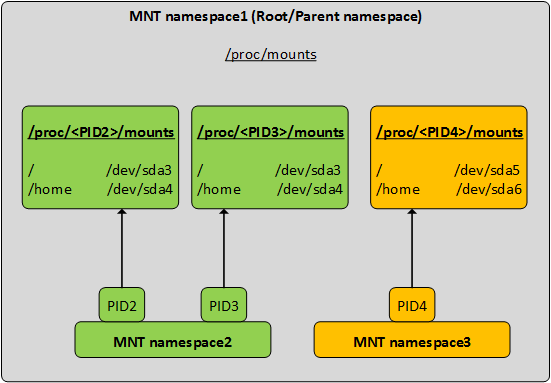
2 Working with MNT namespaces
The examples use a user namespace (--user --map-root-user) so that no root is needed. As root the same commands work without these two options (unshare --mount ...).
2.1 The mounts of the default namespace
Count the mounts of the default namespace and note which MNT namespace the shell is in. Every process has its list of mounts in /proc/PID/mountinfo.
$ wc -l < /proc/self/mountinfo
$ 28
$ head -2 /proc/self/mountinfo
$ 71 1 252:0 / / rw,relatime shared:1 - xfs /dev/mapper/vg-root rw,attr2,inode64,logbufs=8,logbsize=32k,noquota
$ 74 71 0:31 / /var/lib/nfs/rpc_pipefs rw,relatime shared:2 - rpc_pipefs rpc_pipefs rw
$ readlink /proc/self/ns/mnt
$ mnt:[4026531841]
2.2 Creating a new MNT namespace
Create a new MNT namespace and look at it from inside. It is a different namespace, yet it has the same 28 mounts: a new MNT namespace starts as a copy of the one it was created from, not as an empty tree.
$ unshare --user --map-root-user --mount sh -c "readlink /proc/self/ns/mnt; wc -l < /proc/self/mountinfo"
$ mnt:[4026534269]
$ 28
2.3 A mount that only the new namespace sees
In terminal 1, create a MNT namespace, mount a tmpfs on /mnt in it, write a file there and leave a process running in the namespace.
$ unshare --user --map-root-user --mount sh -c 'mount -t tmpfs none /mnt; echo hello > /mnt/file; findmnt /mnt; ls /mnt; exec sleep 611'
$ TARGET SOURCE FSTYPE OPTIONS
$ /mnt   none   tmpfs  rw,relatime,uid=1000,gid=1000,inode64
$ file
In terminal 2, in the default namespace, look for the same mount. findmnt prints nothing: the host does not see it.
$ findmnt /mntWhat differs between two MNT namespaces is only what was mounted or unmounted after the copy was made.
2.4 Propagation
Whether a later mount is passed on to other namespaces is decided by the propagation type of each mount. On the host the root is shared. unshare sets everything in the new namespace to private, which is why the tmpfs above stayed inside.
$ findmnt -o TARGET,PROPAGATION /
$ TARGET PROPAGATION
$ /      shared
$ unshare --user --map-root-user --mount findmnt -o TARGET,PROPAGATION /
$ TARGET PROPAGATION
$ /      private
2.5 Checking that the new MNT namespace exists
In terminal 2, find the namespace of the process left running in step 2.3 (here PID 1226729). Its mount list has one line more than the host, the tmpfs.
$ readlink /proc/1226729/ns/mnt
$ mnt:[4026534269]
$ lsns -t mnt -p 1226729
$         NS TYPE NPROCS     PID USER COMMAND
$ 4026534269 mnt       1 1226729 user sleep 611
$ wc -l < /proc/1226729/mountinfo
$ 29
$ tail -1 /proc/1226729/mountinfo
$ 711 683 0:87 / /mnt rw,relatime - tmpfs none rw,uid=1000,gid=1000,inode64
2.6 Entering the namespace
nsenter runs a command in the namespaces of another process. The MNT namespace here belongs to a user namespace, so both are entered (-U -m); the file written in step 2.3 is there.
$ nsenter -t 1226729 -U -m --preserve-credentials cat /mnt/file
$ hello
$ nsenter -t 1226729 -U -m --preserve-credentials findmnt /mnt
$ TARGET SOURCE FSTYPE OPTIONS
$ /mnt   none   tmpfs  rw,relatime,uid=1000,gid=1000,inode64
When the last process in the namespace ends (kill 1226729), the namespace and the tmpfs in it are gone.
Current practice (checked 2026-10)
- Propagation default:
unsharemakes all mounts private in the new namespace since util-linux 2.27, because systemd remounts everything shared at boot. With an olderunshare, or with--propagation unchanged, a mount made inside can appear on the host. - Compared with chroot: tools that want a different root (bubblewrap, container runtimes) build it inside a mount namespace: mount an empty tmpfs, bind what should be visible, then
pivot_rootand unmount the old root. - What root in a user namespace may mount: a tmpfs, a fresh
/procor bind mounts, as shown above. Mounts inherited from the host cannot be unmounted one by one from there, and their read-only, nosuid and noexec flags stay locked.
Sources: