SDD 08 - OpenSpec: Lab Route
SDD Learning · Previous: OpenSpec starter guide · Next: BMAD Method starter guide
Levels 2 to 6 with OpenSpec. Change a contract on purpose: start from a baseline, write a delta, collect evidence and bring the baseline up to date. Read the OpenSpec starter guide first: it explains the tool, and this page applies it to the shared lab.
Walk the Matt Pocock Skills lab route first if you have not: it is the baseline this route is compared with.
openspec ... in the terminal and /opsx:... in the agent chat. Verify is not in the documented default core profile; level 5 shows how to enable it.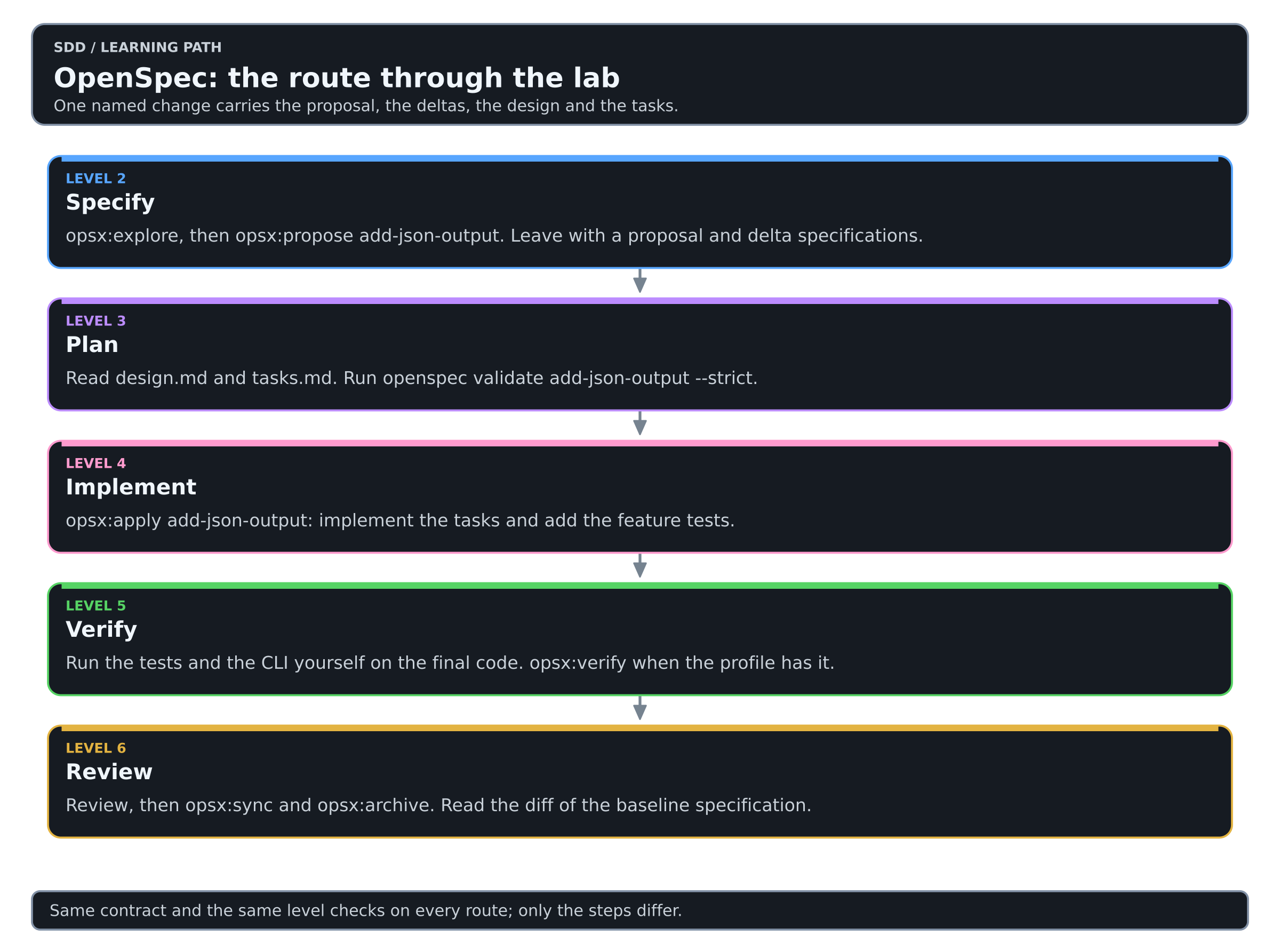
Colors mean the same thing in every diagram of this Learning: see the color key.
The route at a glance
| Level | What you use | What it leaves behind |
|---|---|---|
| 2 · Specify | /opsx:explore, /opsx:propose | A proposal and delta specifications |
| 3 · Plan | design.md, tasks.md, openspec validate | A validated change package |
| 4 · Implement | /opsx:apply | The change and its tests |
| 5 · Verify | Your own run; /opsx:verify when enabled | Observed results on the final code |
| 6 · Review | Review, /opsx:sync, /opsx:archive | An updated baseline and archived history |
The contract, the acceptance criteria AC1 to AC7 and the level checks are the same on every route and are described in the lab. Only the steps differ.
Set up once
Download the starter lab, unpack it and run the baseline from a fresh copy of its doc-index-starter directory:
$ python3 -m unittest discover -v
$ python3 doc_index.py sample-docs
The four baseline tests pass and the CLI prints two filename/title rows. Install OpenSpec as the starter guide describes. Then initialize it in the lab directory and select your coding tool:
$ openspec --version
$ openspec init
Start or reload the assistant so it discovers the generated instructions.
Record the installed version, the agent and the model in training/WORKSHEET.md.
Level 2 · Specify
Begin in agent chat with exploration:
/opsx:explore We want to add --format json to this CLI. Inspect doc_index.py and its tests. Explain the existing output, sorting, title fallback, top-level scan and error behavior. Identify only decisions needed for JSON output. Do not implement yet.
Then propose one named change:
/opsx:propose add-json-output

Add an optional --format json mode to the existing Markdown indexing CLI. Keep default text output byte-for-byte unchanged (AC1). JSON is an array of objects (AC2) with exactly the string fields file and title, sorted by filename (AC3). An empty directory returns [] (AC4). Unknown formats and missing directories fail with a nonzero exit status, a useful stderr message and empty stdout (AC5). Quotes and non-ASCII characters in titles survive JSON encoding and decoding (AC6). Keep the top-level-only scan and the title fallback (AC7). Use the Python standard library only. Do not add recursion, network access, a database or a web interface.
Read proposal.md and the delta specifications under openspec/changes/add-json-output/. Check whether the proposed behavior matches the change you intended.
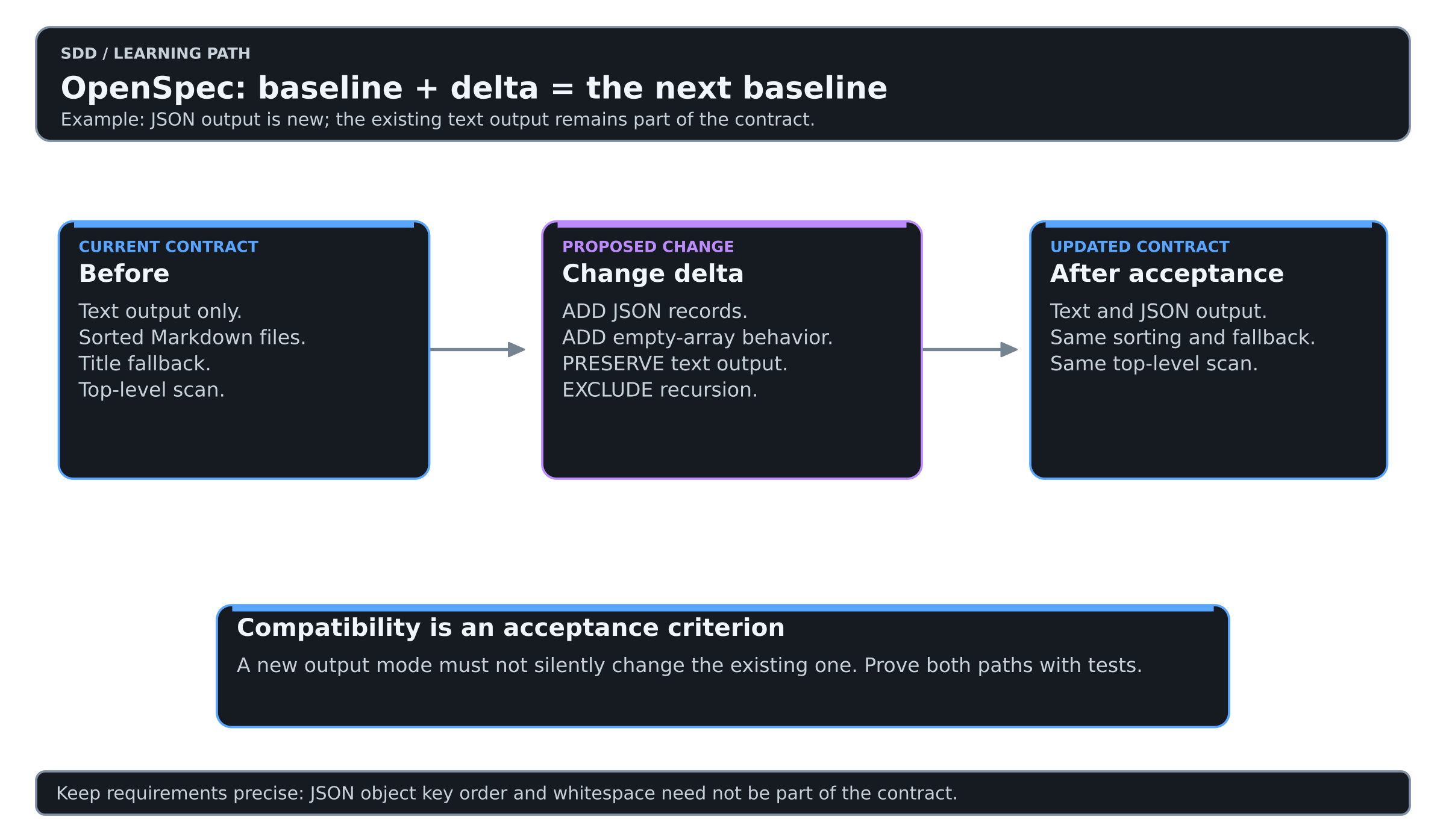
Level 2 check: a partner can explain the promised behavior and the exclusions from the artifact alone.
Level 2 complete. You turned “add JSON” into a contract someone else can check. Good work: this is the step most people skip.
Level 3 · Plan
Read design.md and tasks.md in the same change directory. Then validate the artifacts in the terminal:
$ openspec validate add-json-output --strictThis checks specification structure and consistency. It does not prove that the Python program behaves correctly.
Complete at least three rows of the worksheet's requirement-to-evidence table, one for compatibility and one for an error case.
Level 3 check: the plan identifies how AC1 will be preserved and checked.
Level 3 complete. Every criterion you care about now points to a task and a check. From here on you build what you have already decided.
Level 4 · Implement
/opsx:apply add-json-output
Inspect the new tests for default-output compatibility, valid JSON, deterministic order, an empty directory, invalid arguments and escaped characters.
Level 4 check: JSON output works, the original tests still pass, and there are new tests for the feature.
Level 4 complete. The feature exists and the old behavior is still there. Run it once more, just to see your JSON come out.
Level 5 · Verify
Run the commands yourself in the lab directory:
$ python3 -m unittest discover -v
$ python3 doc_index.py sample-docs
$ python3 doc_index.py sample-docs --format json
The default output should still be the original two tab-separated rows. The JSON should parse to this value; spacing is unimportant:
[{"file":"alpha.md","title":"Alpha"},{"file":"beta.md","title":"beta"}]The new tests should also cover an empty directory, an invalid format, a missing directory and a title containing quotes or non-ASCII text. Record the commands, the results and the revision in the worksheet. The independent checker in the trainer kit can be run against your directory.
For the expanded verification workflow, enable it with the interactive profile configuration and regenerate the agent files:
$ openspec config profile
$ openspec update
Select a custom workflow set containing verify, reload the agent, then use:
/opsx:verify add-json-output
Keep ordinary tests and human review even when the verification skill is enabled. They answer different questions from a structural validator.
Level 5 check: the evidence is from the final code and every unmet criterion is visible.
Level 5 complete. You can show what ran and what it returned. Enjoy the passing run.
Level 6 · Review
After acceptance, reconcile the deltas with the current specifications:
/opsx:sync add-json-output
Then close the change:
/opsx:archive add-json-output
Read the resulting spec diff. A feature is not properly closed if the maintained specification still describes its old behavior. Then have a second participant answer the handoff questions.
| Handoff question | Evidence to point to |
|---|---|
| What did we agree? | Accepted behavior and exclusions |
| What changed? | The implementation diff and the bounded task |
| How was it checked? | Test command, result and checked revision |
| What remains? | A precise gap or next task |
If the next participant must reconstruct the entire chat to answer these questions, improve the durable record.
Level 6 check: the worksheet states accepted, incomplete or needs revision, says why, and points to what the next session must read.
Level 6 complete. You have walked the whole loop on this route. Take a moment to enjoy that before you go on.
Track checkpoint
Explain which requirement is new and which behavior must remain unchanged. Then show where the accepted JSON requirement lives after synchronization.
OpenSpec lab route complete. You can now change a contract through a delta and leave the baseline up to date.
Compare with your baseline
Put this worksheet beside the one from the Matt Pocock Skills lab route. Which corrections did each route need, which artifacts would you keep, and what would a fresh session find first? The comparison says what to observe. The routes differ in emphasis, and one run is not a ranking.