Namespaces 11 - IPC namespace
Linux Namespaces Learning · Previous: Connecting two network namespaces (ns1, ns2) - with two ports on a distributed OVS switch (openvswitch) · Next: USER namespace
IPC (interprocess communication) namespaces in Linux
1 Introduction
The IPC namespace isolates the interprocess communication objects that are not named by a path in the filesystem: the System V objects (message queues, semaphore arrays, shared memory segments) and the POSIX message queues. Each IPC namespace has its own set of System V identifiers and its own POSIX message queue filesystem. Processes in the same IPC namespace can reach each other's objects; processes in different IPC namespaces cannot.
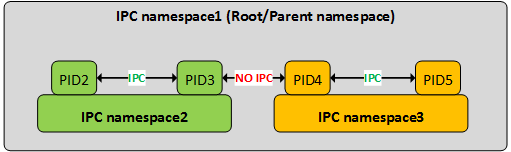
In the picture, PID2 and PID3 share IPC namespace2 and can talk through these objects, and so can PID4 and PID5 in IPC namespace3. Between PID3 and PID4 there is no such channel, although all four run on the same kernel.
An IPC namespace does not cover anything that is a file. POSIX shared memory lives as files in /dev/shm, named POSIX semaphores too, and UNIX sockets and FIFOs have path names. Those follow the mount namespace and the file permissions.
The examples were run as an ordinary user on a 6.12 kernel with util-linux 2.40. They borrow --user --map-root-user from the next article, the USER namespace, so that no root is needed; as root the same commands work with unshare --ipc alone.
2 Working with IPC namespaces
2.1 IPC objects in the default namespace
Note the IPC namespace of the shell and create one object of each System V kind with ipcmk: a message queue, a shared memory segment of 4096 bytes and a semaphore array with one semaphore.
$ readlink /proc/self/ns/ipc
$ ipc:[4026531839]
$ ipcmk -Q
$ Message queue id: 0
$ ipcmk -M 4096
$ Shared memory id: 2
$ ipcmk -S 1
$ Semaphore id: 4
ipcs lists them.
$ ipcs
$
$ ------ Message Queues --------
$ key        msqid      owner      perms      used-bytes   messages
$ 0x3955e60c 0          user       644        0            0
$
$ ------ Shared Memory Segments --------
$ key        shmid      owner      perms      bytes      nattch     status
$ 0x4475c7b5 2          user       644        4096       0
$
$ ------ Semaphore Arrays --------
$ key        semid      owner      perms      nsems
$ 0x1d83be53 4          user       644        1
$
2.2 A new IPC namespace sees none of them
Run the same ipcs in a new IPC namespace. All three tables are empty.
$ unshare --user --map-root-user --ipc ipcs
$
$ ------ Message Queues --------
$ key        msqid      owner      perms      used-bytes   messages
$
$ ------ Shared Memory Segments --------
$ key        shmid      owner      perms      bytes      nattch     status
$
$ ------ Semaphore Arrays --------
$ key        semid      owner      perms      nsems
$
2.3 Objects created inside vanish with the namespace
Create a message queue inside a new IPC namespace. The numbering starts again at 0, and the owner is the root of the user namespace.
$ unshare --user --map-root-user --ipc sh -c "readlink /proc/self/ns/ipc; ipcmk -Q; ipcs -q"
$ ipc:[4026534271]
$ Message queue id: 0
$
$ ------ Message Queues --------
$ key        msqid      owner      perms      used-bytes   messages
$ 0x63216084 0          root       644        0            0
$
That namespace ended with its last process, and the queue went with it. A second new namespace is empty again, and the default namespace still has only its own queue from step 2.1. On the host a System V object stays until somebody removes it; in a namespace it cannot outlive the namespace.
$ unshare --user --map-root-user --ipc ipcs -q
$
$ ------ Message Queues --------
$ key        msqid      owner      perms      used-bytes   messages
$
$ ipcs -q
$
$ ------ Message Queues --------
$ key        msqid      owner      perms      used-bytes   messages
$ 0x3955e60c 0          user       644        0            0
$
2.4 POSIX message queues
POSIX message queues are shown by a filesystem of type mqueue, usually mounted on /dev/mqueue, and their limits are in /proc/sys/fs/mqueue. Creating a file there creates a queue.
$ findmnt /dev/mqueue
$ TARGET      SOURCE FSTYPE OPTIONS
$ /dev/mqueue mqueue mqueue rw,nosuid,nodev,noexec,relatime
$ touch /dev/mqueue/demo-queue
$ ls /dev/mqueue
$ demo-queue
$ cat /dev/mqueue/demo-queue
$ QSIZE:0          NOTIFY:0     SIGNO:0     NOTIFY_PID:0
$ cat /proc/sys/fs/mqueue/queues_max
$ 256
A new IPC namespace has its own, empty set of queues, but the directory /dev/mqueue you look at is still the mount that belongs to the old namespace, so the listing misleads:
$ unshare --user --map-root-user --ipc ls /dev/mqueue
$ demo-queue
Add a mount namespace and mount the mqueue filesystem of the new IPC namespace. Now the host's queue is not there, a queue created inside is, and the limit in /proc/sys/fs/mqueue can be changed for this namespace alone.
$ unshare --user --map-root-user --ipc --mount sh -c "mount -t mqueue mqueue /dev/mqueue && ls -l /dev/mqueue; touch /dev/mqueue/inside-queue; ls /dev/mqueue; cat /proc/sys/fs/mqueue/queues_max; echo 5 > /proc/sys/fs/mqueue/queues_max; cat /proc/sys/fs/mqueue/queues_max"
$ total 0
$ inside-queue
$ 256
$ 5
Back on the host nothing has changed.
$ ls /dev/mqueue
$ demo-queue
$ cat /proc/sys/fs/mqueue/queues_max
$ 256
2.5 What is not isolated
A file in /dev/shm, which is what POSIX shared memory is, stays visible in a new IPC namespace.
$ echo not-isolated > /dev/shm/demo-shm
$ unshare --user --map-root-user --ipc cat /dev/shm/demo-shm
$ not-isolated
To hide it you need a mount namespace with its own /dev/shm, which is what container engines set up.
2.6 Checking and entering an IPC namespace
In terminal 1, create a shared memory segment in a new IPC namespace and leave a process running there.
$ unshare --user --map-root-user --ipc sh -c 'ipcmk -M 4096 >/dev/null; exec sleep 622'
In terminal 2, lsns -t ipc lists the IPC namespaces. On a desktop there are many: browsers put their sandboxed processes into IPC namespaces of their own.
$ lsns -t ipc -p 1229931
$         NS TYPE NPROCS     PID USER COMMAND
$ 4026534273 ipc       1 1229931 user sleep 622
$ lsns -t ipc
$         NS TYPE NPROCS     PID USER COMMAND
$ 4026531839 ipc      10    4085 user catatonit -P
$ 4026532889 ipc       1   72596 user /usr/lib64/firefox/firefox -contentproc ...
$ ...
$ 4026534273 ipc       1 1229931 user sleep 622
nsenter with -i enters the IPC namespace of the process (and -U its user namespace). The segment seen there is not the one of the default namespace.
$ nsenter -t 1229931 -U -i --preserve-credentials ipcs -m
$
$ ------ Shared Memory Segments --------
$ key        shmid      owner      perms      bytes      nattch     status
$ 0x9cc2ba80 0          root       644        4096       0
$
$ ipcs -m
$
$ ------ Shared Memory Segments --------
$ key        shmid      owner      perms      bytes      nattch     status
$ 0x4475c7b5 2          user       644        4096       0
$
2.7 Cleaning up
The objects made in the default namespace stay until they are removed. Remove them by id, and delete the queue and the file.
$ ipcrm -q 0
$ ipcrm -m 2
$ ipcrm -s 4
$ rm /dev/mqueue/demo-queue /dev/shm/demo-shm
3 Check yourself
Answer these before you look at the answers:
- Two programs exchange data through a System V shared memory segment. You start one of them with
unshare --ipc. Can they still do so? No. The segment exists in one IPC namespace only; the other program would create or look for it in its own, empty one. - A program in a new IPC namespace opens
/dev/shm/data. Does it see the file a host program created there? Yes, unless it also has its own mount of/dev/shm. Files are a matter of the mount namespace. ls /dev/mqueuein a new IPC namespace shows the queues of the host. Are they shared? No. The listing comes from the old mount; after mounting a freshmqueuefilesystem the new namespace shows only its own queues.- You created a message queue inside
unshare --ipcand the command ended. Do you have to runipcrm? No. When the last process of an IPC namespace ends, all objects in it are destroyed.
Sources: