SDD 05 - Spec Kit: Quick & Dirty Starter Guide
SDD Learning · Previous: Matt Pocock Skills lab route · Next: Spec Kit lab route
Spec Kit gives a coding agent a visible route from a requirement to a reviewed implementation. The useful part is the chain of artifacts: the feature specification says what must happen, the plan explains the technical approach, and the tasks make the work executable in small steps.
This is the specification-first counterpart to the Matt Pocock Skills starter guide. Where Matt's skills let you assemble an engineering workflow, Spec Kit supplies a more explicit specification and planning structure.
What you install
The project is github/spec-kit. The executable is specify, distributed as specify-cli. Initialization installs project support files and instructions for your chosen coding agent. The model and agent still perform the reasoning and code changes.
speckit.org is a useful entry point, but use the upstream installation guide and generated commands when instructions disagree. In particular, do not mix an older tutorial's command names with a newer integration.
Quick start
You need Python 3.11 or newer, uv, and a supported coding agent. Git is useful for reviewing and reverting changes. These shell examples target Linux, macOS, or WSL.
Run in the terminal:
$ uv tool install specify-cli
$ specify version
$ specify init spec-kit-demo --integration copilot
$ cd spec-kit-demo
Open your coding agent in this directory. The examples below use Copilot's default skills mode. Invoke each command separately in the agent chat and read its output before continuing.
/speckit-constitution Keep the project small. Preserve documented behavior. Test observable behavior. Avoid unnecessary dependencies. Require actual verification evidence before calling a change complete.
For another agent, choose its integration at initialization. specify integration list shows the available keys. The integration reference describes their layouts; some command-mode integrations use dotted names such as /speckit.specify. Use the names your agent exposes.
The workflow to learn first
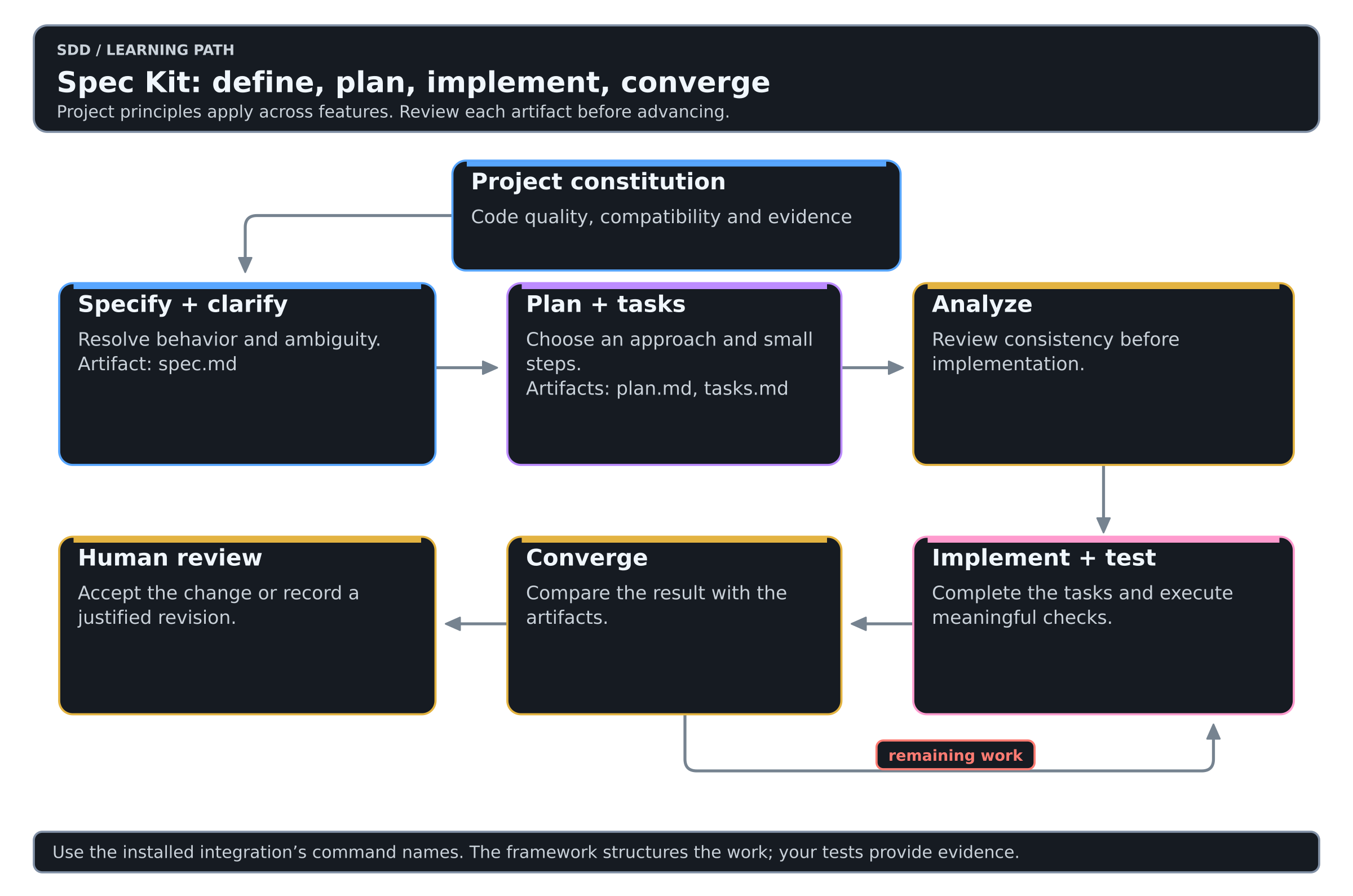
Colors mean the same thing in every diagram of this Learning: see the color key.
The constitution is a project-level document. The specification, plan and tasks belong to a feature. Avoid rewriting project principles every time you add a flag.
| Stage | What should become clearer |
|---|---|
speckit-constitution | The engineering rules the project intends to follow |
speckit-specify | User-visible behavior, scope and acceptance scenarios |
speckit-clarify | Decisions that would otherwise be guessed |
speckit-plan | Architecture, dependencies and verification approach |
speckit-tasks | Work small enough to execute and check |
speckit-analyze | Contradictions between specification, plan and tasks |
speckit-implement | Code changes and execution evidence |
speckit-converge | Whether implementation and artifacts agree, and what remains |
The upstream SDD quickstart also describes speckit-checklist. That checklist reviews the quality of requirements. Checking an item does not prove that the corresponding behavior works.
What survives the conversation
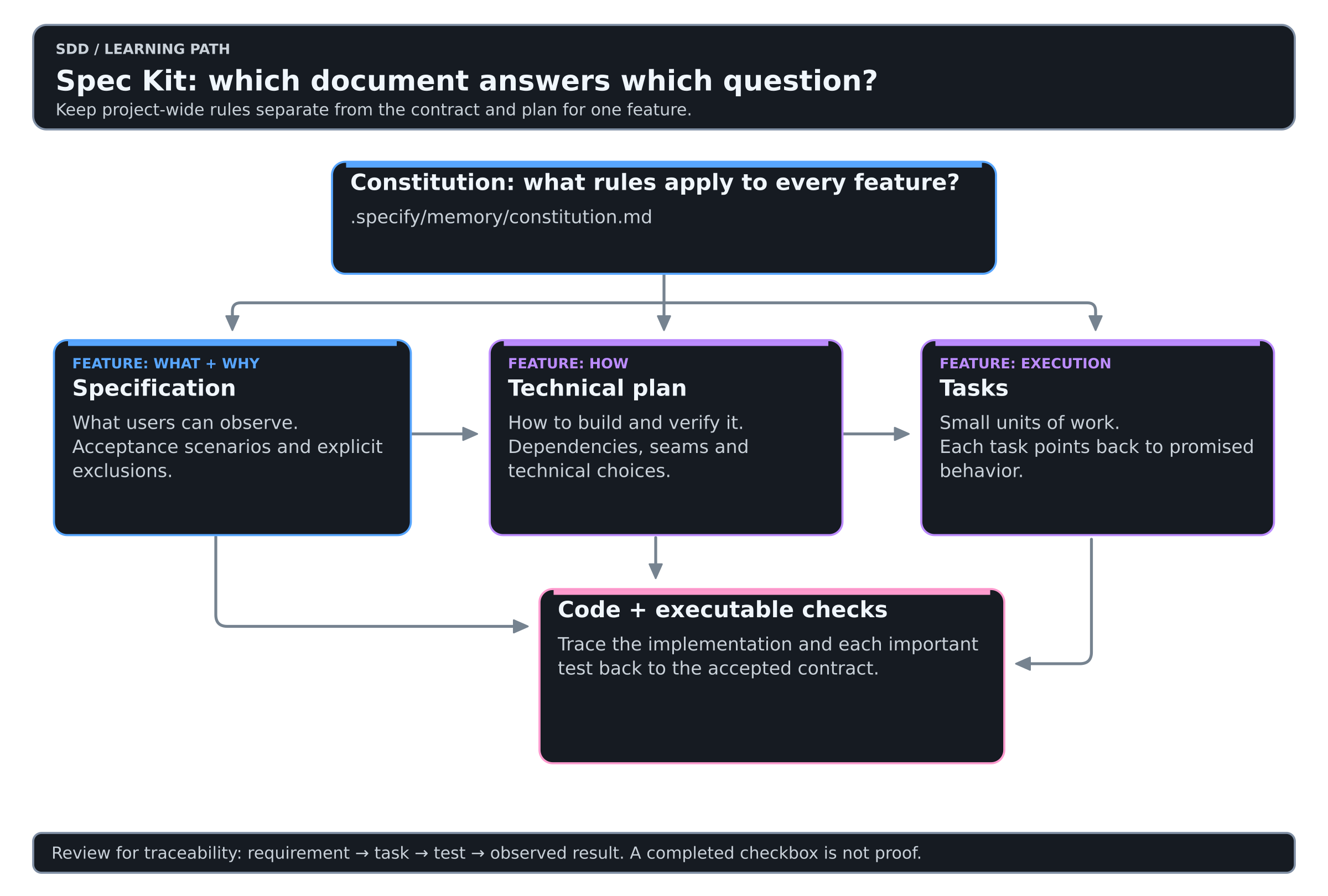
| Artifact | Why it matters |
|---|---|
.specify/memory/constitution.md | Shared project principles |
Feature spec.md | The requirement you can review independently of code |
Feature plan.md | Technical decisions and verification strategy |
Feature tasks.md | Work breakdown and completion state |
.specify/feature.json | The active feature in the current upstream workflow |
| Tests and Git history | Evidence and an inspectable change boundary |
Let the installed tooling choose the feature directory. Current upstream documentation resolves the active feature through .specify/feature.json; changing Git branches alone does not select a different feature. Older examples that assume branch-based selection can therefore be misleading.
How much process does the work deserve?
| Situation | Practical starting point |
|---|---|
| A feature crosses sessions or contributors | The SDD workflow |
| One obvious wording correction | Your normal editing workflow |
| A difficult existing bug | Investigate first; current Spec Kit also offers an optional bug extension |
| An uncertain product idea | Establish whether it deserves investment before producing a feature plan |
| An existing codebase | Read its behavior and tests before writing replacement assumptions |
The current repository documents independent bug-fixing and idea-assessment extensions. They are optional entry points; you do not have to run SDD before diagnosing a bug. See the repository's process overview.
Common mistakes
| Instead of | Prefer |
|---|---|
| Putting stack choices into every requirement | Keep behavior in the spec and implementation decisions in the plan |
| Running every command without reading its output | Review the handoff artifacts |
| Treating a checklist as a test suite | Execute behavior tests |
| Editing code while the spec says something else | Update the decision and implementation together |
| Copying slash commands into Bash | Run specify in the terminal and skills in agent chat |
| Assuming every generated file is useful | Remove ceremony that does not improve the handoff |
Practice on the shared lab
The Spec Kit lab route walks levels 2 to 6 of the SDD Learning with Spec Kit. It is the same small change every track uses: add JSON output to a tiny CLI and keep its text output unchanged.
A pragmatic adoption path
- Walk the lab route and record the output of
specify version. - Try one feature that is large enough to benefit from a written contract.
- Review the specification before looking at the implementation.
- Measure how often the agent needed clarification or violated an acceptance criterion.
- Keep useful project principles and simplify templates that encourage repetition.
My recommendation: choose Spec Kit when the missing piece is a consistent route from a requirement to an implementation plan. Keep the artifacts short enough that a human will review them.